Email sequence or internal CRM workflow: choose the job before the plan
Konekt CRM · Research and teaching cases prepared 7 November 2026
Choose an email sequence when the job is a planned series of communications with a recipient. Choose an internal CRM workflow when an event should prompt a colleague, create follow-through or route a decision. Then inspect the actual actions: a workflow can send email, and a sequence can create tasks. Their names do not prevent two automations from sending the same message.
This guide helps a small sales team decide what it needs to buy and verify. Two fictional cases turn a follow-up promise and a proposal-review event into separate requirements. Konekt controls observed in a read-only review are identified below; no email, trigger, workflow or reply-stop behavior was executed for this article.
Start with the recipient of the next action
Write the event, the intended recipient and the result you need. “Remind someone about the proposal” is ambiguous: it could mean sending another message to the prospect, notifying the salesperson or creating a task for a manager. Those actions need different content, access and review.
An external email should have an appropriate sender, a reason for that recipient and a rule for what happens after a reply. An internal notification should identify the responsible colleague and the decision or work they must complete. A reminder appearing in a list does not establish that the work was done, and an email recorded as sent does not establish that the buyer accepted the proposal.
Keep that distinction when comparing plans. A catalogue allowance for email sequences does not, by itself, establish every CRM trigger, notification route or workflow action. Conversely, a visible Gmail action in a workflow editor does not make it a suitable replacement for a reviewed recipient sequence.
Use vendor terminology as a starting point
HubSpot's sequence documentation, checked on 7 November 2026, describes timed email templates and task reminders. It distinguishes an automated email from a manual email task: the latter reminds the user rather than sending automatically. That documented distinction is useful when a supplier says a sequence contains a “follow-up step.” Ask which kind.
Pipedrive's automation introduction describes triggers and actions, including administrative record work and email actions. Its update-trigger guidance distinguishes selected field changes from a broad update and explains conditions. These are examples of documented product contracts, not settings or capabilities proven in Konekt.
The practical comparison therefore has three parts: what starts the work, who receives the action and what evidence closes it. A particular vendor may connect sequences and workflows. If it does, check the enrollment and execution relationship explicitly rather than assume the two menus operate independently.
Case one: an agreed prospect follow-up
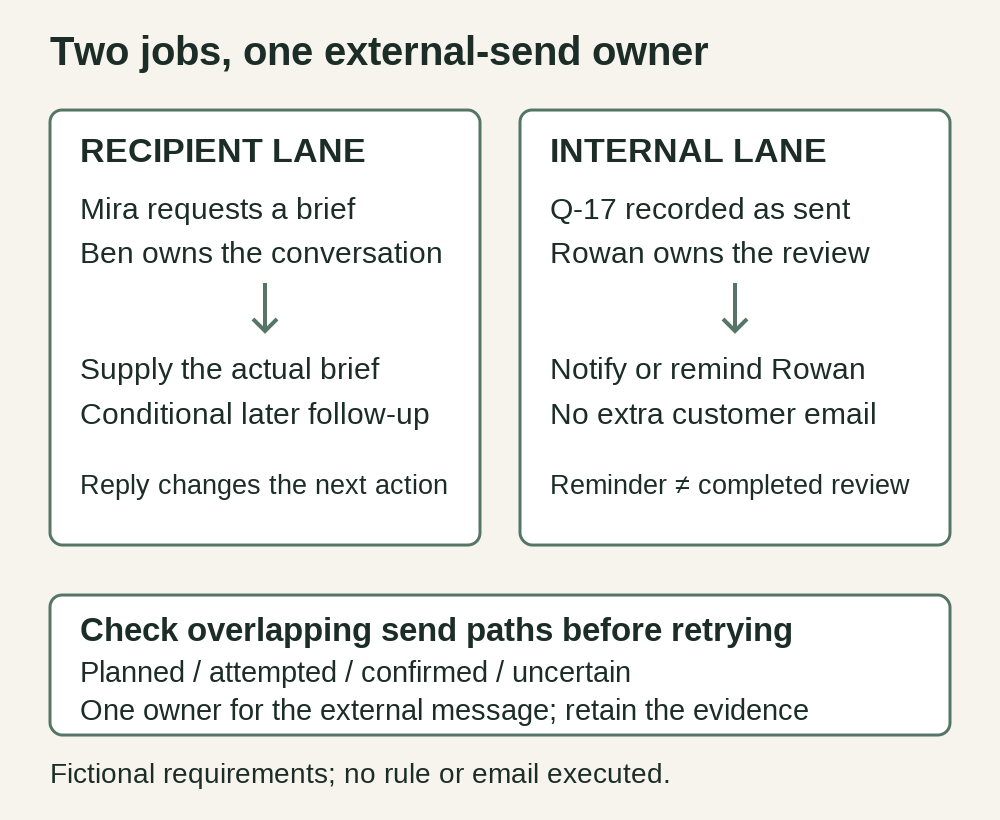
All people, businesses, messages and dates in these cases are invented. No prospect was contacted. In the first case, Mira at Demo Alder asks Ben for a two-page service brief and says: “Send it today; if I have not replied, check with me on Monday.” Ben owns the conversation. The team is deciding how to preserve that specific promise, not create a general campaign for everyone at Alder.
| Requirement | Filled decision |
|---|---|
| Entry | The supplied conversation contains Mira's request and Ben's responsibility. |
| First external action | Ben supplies the actual brief with a short contextual message. |
| Conditional later action | One Monday follow-up is proposed only if there is still no reply and the agreed check remains appropriate. |
| Exit or review | A reply, a changed request or an existing action by a colleague requires review before another message. |
| Owner and evidence | Ben retains the conversation, the actual send state and the next decision. |
The opening can be straightforward: “Hi Mira — here is the two-page brief we discussed. The second page shows what we need from your team before scoping the review.” The proposed Monday message is: “Hi Mira — checking back as agreed. Is there a question about the brief I can help answer?” These are fictional draft messages; neither has been sent or tested for effectiveness.
If Mira instead asks whether migration is included, Ben must answer that question from the actual service scope. The old follow-up pitch is no longer the right next action. If she asks for no further contact, the team must handle that request before any remaining outreach. No automatic suppression is assumed.
A supported sequence can be useful when the team repeatedly performs this kind of appropriately agreed follow-up and can verify its controls. For a single exchange, a manual email and a clear task may be sufficient. The purchasing decision is conditional on the repeated work, not the presence of two message drafts.
Case two: an internal reminder after a commercial event
In the second fictional case, a team has recorded that proposal Q-17 was sent for Demo Birch. Its policy is for the opportunity owner, Rowan, to review the record at the next staffed sales review: confirm the current version, identify any unanswered question and decide the next action. The required output is an internal reminder, not an additional email to Birch.
The desired trigger is the recorded proposal-sent event associated with the intended opportunity. That event name and relationship are requirements in this case; this article does not establish that Konekt offers that exact trigger or automatically links its document and opportunity views. If it cannot be represented through a supported event, keep a manual reminder rather than substitute an unrelated generic update.
The reminder could read: “Q-17 recorded as sent. Rowan: check the current proposal and latest exchange before deciding follow-up.” It should point the authorized colleague to the appropriate record, without distributing unnecessary document contents. Its due point is the team's agreed review, not an invented product scheduling capability.
| Part | Proposed treatment | Hold condition |
|---|---|---|
| Trigger | Record the specific Q-17 sent event once for this review job. | Event or opportunity relationship cannot be established. |
| Action | Internal notification or reminder to Rowan. | The only offered action would send an unintended customer email. |
| Owner | Rowan reviews context and chooses the next step. | Owner unavailable or record access missing. |
| Completion | Record the resulting decision or remaining question. | A notification appears, but the review has not occurred. |
This is a workflow candidate because the recurring job begins with a commercial event and coordinates internal work. It is not an instruction to send a new sequence whenever any opportunity field changes. The operational planning guide, in French, owns the wider division of responsibilities; this article narrows the buying requirement to the event and its action.
What the Konekt inspection actually established
A read-only product inspection on 7 November 2026 found separate email-campaign and workflow surfaces. The summary below translates the observed categories into English. It does not reproduce private workflow contents or customer records, and it does not report that a rule was created, saved, tested or activated.
| Surface | Observed | Still untested |
|---|---|---|
| Email campaigns | Campaign list, status filters, navigation to automatic emails and templates; a Gmail-connected label in the account shell. | Email sending, delivery, reply synchronization, suppression and the full sequence setup. |
| Workflows | Active, paused, draft and execution views; editor palette with CRM-event, received-email and received-webhook trigger categories. | Whether the exact event required by either case is available and behaves correctly. |
| Workflow actions | Gmail email, notification and event-reminder action categories. | Recipients, owner routing, scheduling, retries, duplicate handling and plan entitlement. |
A Gmail-connected label is not proof that a particular email synchronized or that every channel shares one Inbox. An execution-history view is not a new execution performed by this review. Inspect the current plan and the exact receiving behavior before relying on either proposed case.
Recover when a sequence and a workflow could send the same email
Suppose a proposed CRM workflow would send Mira a Monday check whenever her opportunity is updated. The sequence already contains that check. This is a design conflict before any run: choose one owner for the external message. The workflow can instead notify Ben to review the conversation, if that internal action is supported and useful.
If the conflict is discovered after activation, stop further affected actions through the supported controls and inspect the actual conversation and available history. Classify each candidate message as planned, attempted, confirmed or uncertain. Do not resend an uncertain action simply to obtain a clean success state. Resolve the evidence first.
Also ask what happens if the same commercial event is recorded twice or a webhook is delivered again. The desired result for Q-17 is one review task for that defined event, not an expanding stack of reminders. Keep a traceable business reference and ask how the actual product prevents or exposes repeat processing. The visible webhook trigger does not establish duplicate protection.
After reconciliation, retain which mechanism owns the external message and which owns the internal review. If the necessary boundary cannot be enforced, keep the external step manual. The overdue-task guide, in French, helps decide which old reminders to cancel, reassign or replan; it does not certify a send retry.
Take the two requirements to the actual offer
Ask the supplier to demonstrate the selected sender, recipient, trigger, owner and stop/review conditions using approved fictional data. Keep email-sequence rights separate from access to the required internal workflow actions. A function visible in an inspected workspace does not establish inclusion in the plan you will buy.
The Konekt public catalogue observed on 7 November advertises email sequences in Solo. It displays Solo at €29 per month on monthly billing, or €19 per month as an annual equivalent with €228 billed for the year. Those are different commitments; tax treatment was not established in the observation. They do not prove that Solo includes every workflow trigger or action used in these proposed cases.
Solo also advertises one team member. If Ben and Rowan both need access, confirm the appropriate offer rather than treat the Solo amount as their team quote. A record owner named in a process and a licensed user with access are separate requirements.
Review Konekt's current plans for the sequence and internal-workflow requirements. The destination is in French; confirm the current period, required member access and exact workflow entitlement before selecting an offer. No plan selection, checkout, delivery or automation execution was performed for this guide. If a manual process already completes the two jobs reliably, keep it until the proposed purchase resolves a real remaining burden.