Shared sales mailbox or CRM: decide from the work that gets lost
Konekt CRM · Research and examples prepared 7 November 2026
Choose a shared mailbox when the work is mainly receiving and answering messages together. Add a CRM when the team also needs durable records of companies, separate opportunities, responsibilities and decisions that extend beyond an email thread. The buying trigger is the context your current arrangement loses, not the number of messages in the inbox.
A CRM may include an inbox, and a mailbox may already be enough for a small sales process. This guide helps an owner or operations lead compare those choices using one fictional working week. It is a procurement method, not a Konekt email-sync demonstration or an assertion that a particular subscription includes the connections your team needs.
Identify what the team is trying to keep track of
A message is evidence of a communication. A conversation groups related exchanges. A company record can hold shared business context, while an opportunity represents a particular buying decision. A task records work someone still needs to do. Those units can overlap without being interchangeable.
If every enquiry reaches one shared address and closes after one coordinated answer, the conversation may be the right unit of work. If one company has two independently buyable assignments, an inbox search for its domain may mix the decisions. The problem is then preserving the relationship between messages and work, not simply making the inbox visible to more people.
Write one sentence describing what a covering colleague must know: “Which proposal is current, what decision is outstanding and who owns the next action?” If your current mailbox answers that reliably, keep it in the comparison as a viable option. A new system should earn its place by resolving an observed gap.
Compare documented routes without inventing a connector
Microsoft's shared-mailbox documentation, checked on 7 November 2026, describes access by multiple internal users and sending as or on behalf of the shared mailbox with appropriate permissions. It requires users to have licensed Exchange Online mailboxes and distinguishes their own access from a direct shared-account sign-in. This is a documented email arrangement, not a completed setup for your team.
There is also a middle route. HubSpot's email-connection guidance distinguishes an individual work-email connection from a team email used by several people in its conversations inbox or help desk. That demonstrates why “mailbox or CRM” is not always a choice between two completely separate applications. Check the actual product, plan and channel arrangement.
Konekt's product site, in French, describes contacts, opportunities and commercial follow-up, alongside an Inbox proposition. The homepage's displayed conversations are explicitly illustrative. They do not establish native Microsoft shared-mailbox synchronization, two-way history, team permissions or successful delivery. Bring the exact mailbox requirement to the evaluation rather than infer it from the word Inbox.
Use six events from one fictional sales week
All companies, people and events below are invented. Demo Fieldwell is a four-person consultancy. Two people answer its sales address, one consultant joins technical calls and its owner reviews open proposals. The exercise has six events, not six qualified leads or customer results.
| Event | Information needed next | Likely unit |
|---|---|---|
| W01: new availability question | Who will reply and whether a reply was sent | Conversation |
| W02: revised proposal arrives | Current proposal, replaced version and decision owner | Opportunity and document reference |
| W03: same company asks about another assignment | Whether either assignment can proceed alone | Two possible opportunities |
| W04: technical call changes scope | Agreed change and unresolved question from the call | Decision and next task |
| W05: salesperson is absent | What the covering colleague can act on | Owner, history and next action |
| W06: prospect declines one option | Which option ended and whether another remains open | Opportunity-specific decision |
Under the stipulated case, the existing mailbox already handles W01 and W05's reply coverage: both operators can find the thread and see who answered. Replacing it merely to “share email” has no demonstrated benefit. The gap appears in W02, W03, W04 and W06, where a thread alone does not supply an agreed record of the business decision.
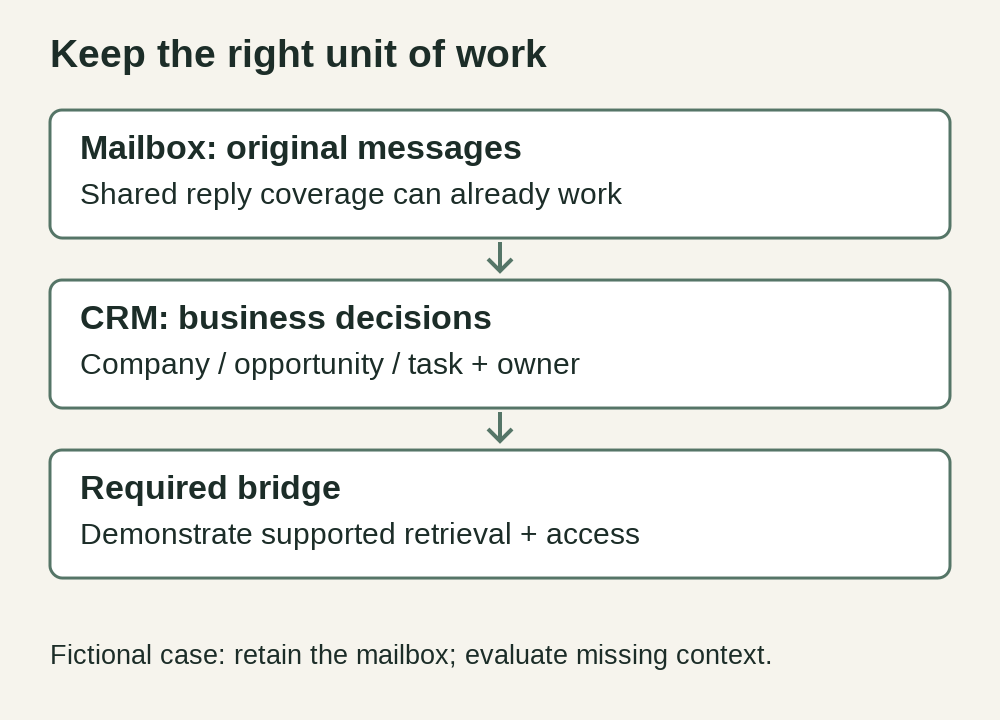
The proposed output is a split responsibility. Keep the mailbox as the message source; evaluate a shared opportunity record for the current proposal, scope decision and next action. If the receiving CRM cannot connect the required evidence in a supported way, include the manual reference work in the decision. No integration is assumed to make that cost disappear.
Define where each fact belongs before testing
Choose a reference location for the original message and a clear location for the business decision. A CRM summary can say that proposal v3 replaced v2 and identify the source exchange. It should not quietly become a second edited copy of every message. Colleagues need to know which source to trust if a summary and an email differ.
For a call or meeting, record the agreed decision and distinguish it from an internal suggestion. Keep the next action, responsible person and useful date together. A mailbox flag can remind its user to return to a thread; confirm whether that flag provides the shared work visibility your team requires.
Do not connect every employee's entire personal mailbox to solve one shared-sales requirement. Define the approved scope, who may see it and what should stay outside the shared record. The supplier must explain the available access and retention controls for that scope. This buying exercise does not replace your organisation's data-handling rules.
Ask the supplier to demonstrate the actual arrival
Specify the email provider, whether the address is a true shared mailbox or a user mailbox with delegates, and whether the requirement is reading, sending, historical import or ongoing synchronization. These are different requests. “Works with Outlook” is too broad to settle them.
Use approved fictional messages first. Observe where a new inbound message appears, who can access it, how a response is represented and how it relates to the intended opportunity. Then examine an unrelated personal message: it should remain outside the agreed shared scope. Record actual behavior separately from the demonstration's promised settings.
If a manual link is the supported method, test that method honestly. Can a covering colleague retrieve the referenced message with their own authorized access? Does a moved folder or removed user break the reference? Do not promise time savings until the team has observed the extra work in its actual routine.
Keep the mailbox when the apparent CRM problem is a recording problem
Suppose a two-person business receives only availability questions and appointment confirmations. Both users see the common mailbox, agree ownership before replying and keep the confirmed appointment in the shared calendar. No independent proposal or account-level decision is getting lost. A larger CRM purchase may add duplicate entry without resolving a material gap.
Another counterexample is missing information. If nobody recorded what the caller agreed, a new pipeline cannot reconstruct it. Correct the recording practice and repeat the affected handover before attributing the failure to the mailbox. Conversely, a consistent process that still cannot represent independent decisions is a stronger reason to evaluate another workspace.
A spreadsheet beside the mailbox can remain a sufficient intermediate arrangement if it is controlled, understandable and maintainable. Include its real upkeep, access and retrieval burden. Do not dismiss it merely because it is not branded as CRM, or call it free when colleagues spend substantial effort repairing it.
Recover from a partial migration
If some conversations already live in the CRM while others remain only in email, pause expansion and identify the authoritative location for each open item. Preserve original messages. Mark incomplete historical coverage rather than let a blank timeline imply that no conversation occurred.
Take one open opportunity at a time. Identify the current proposal, latest supported decision, next action and message reference. Resolve duplicate opportunities by the underlying buying decision, not by matching subject lines. Avoid merging independently buyable work merely because the same company appears in both.
Keep the manual bridge documented until the supported connection passes the relevant tests. A failed or incomplete sync should lead to a visible reconciliation task, not a second uncontrolled history. Repeat the exact previously failing arrival before calling the issue resolved.
Finish with a purchase decision tied to the missing work
The fictional consultancy's decision is conditional: retain its functioning mailbox; evaluate the opportunity and task record needed for W02, W03, W04 and W06; confirm access and the supported link before subscribing. Another team could reasonably keep its mailbox-only setup or select a CRM's native team inbox.
Use the five-record pilot once you have identified the requirement. For a Konekt evaluation, take the six-event comparison to the existing product-offer route and ask which setup meets it. Confirm the current plan, access, billing commitment and integration boundary. Konekt CRM is a separate product from Leadsforlinked; no Leadsforlinked allowance or proposed trial supplies these CRM rights.