Compare CRM seat pricing with the people who need access
Konekt CRM · Research and examples prepared 7 November 2026
Compare CRM pricing from the people and actions that require access, then apply the supplier's actual seat and contract rules. Headcount, occupied seats and billable seats can be different numbers. An advertised monthly equivalent is also different from the payment due for an annual commitment.
This guide helps a small team prepare a licence comparison before it accepts an offer. It uses a current public Pipedrive price for transparent arithmetic and HubSpot's documented seat distinctions as a counterexample to assuming every vendor works alike. It does not quote a Konekt team price or certify any user's access in those products.
Start with actions, not job titles
“Sales needs four users” is a starting statement, not a complete access model. Who creates opportunities? Who edits company details, adds notes, exports data, sends from the system, changes settings and approves the bill? A director who only reads a pipeline can have a different requirement from a director who regularly changes forecasts.
List named roles and the minimum actions each must perform. Keep occasional cover in the list: a user needed only during absence can still require licensed access. Distinguish a person needing a report from someone needing direct access to the underlying customer records. Do not label the second person a viewer merely to reduce a modelled cost.
Access scope matters alongside actions. A contractor might need only a subset of records, whereas an internal sales administrator needs broad editing. Record that boundary before asking about a seat type. A cheap licence that exposes too much information is not a fit for the stated task.
Build the requirement inventory
This fictional consultancy has eight people in the comparison. The requirements below are invented; none represents a verified Konekt customer or a vendor entitlement.
| People | Required actions | Question for supplier |
|---|---|---|
| Three sellers | Create and edit their contacts, opportunities and activities | Which licence and permissions cover these actions? |
| One covering administrator | Edit records and reassign work during absence | Is occasional access charged and what scope is permitted? |
| One manager | Read dashboards and add review notes | Does the proposed viewer role allow notes? |
| One analyst | Read and filter approved reports | Can reports be shared without full record access? |
| One finance colleague | Obtain the agreed billing export | Does export need a paid seat or an authorized delivery route? |
| One external contractor | Review only an approved project subset | Is external restricted access supported at all? |
The inventory accounts for all eight people without assigning eight paid seats or promising four free ones. The unresolved items are purchasing questions. If finance can use an approved delivered report, record that workflow and its owner; do not quietly assume an unavailable API or automated export.
Read each vendor's seat rules independently
HubSpot's seat-management documentation, updated 15 October and checked 7 November 2026, distinguishes seat access from permissions. Its current View-Only description permits viewing and notes on visible CRM records, while restricting record edits and email logging. It also describes Core and specialist seats, with account-model differences. Therefore “viewer” is not a reliable cross-vendor synonym for either zero interaction or every occasional task.
The same document explains that seat reductions are constrained by minimum commitments and billing timing. Removing a user's access is not necessarily an immediate reduction to the invoice. Check the applicable subscription model and order form rather than apply a general rule from another account.
Pipedrive's pricing explanation states that accounts are charged per seat whether the seat is occupied or open. That is the rule used in the arithmetic below. It does not establish a free-viewer option, contractor access or the correct plan for the fictional team.
Turn one real advertised price into a bounded calculation
On 7 November 2026, Pipedrive's English pricing page displayed Lite at US$14 per seat per month billed annually, explicitly one payment of US$168 per seat per year. The worked calculation uses that USD annual price only. It is not a monthly-cancellable US$14 offer, a euro conversion or a personalized supplier quote.
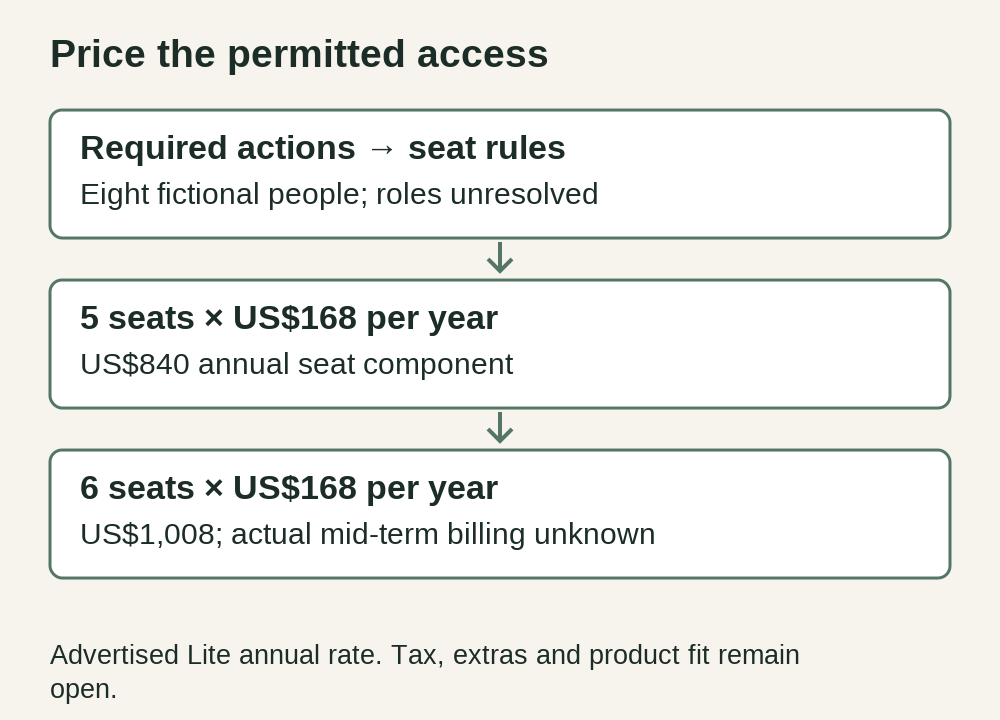
Assume, solely for arithmetic, that the order contains five Lite seats: four occupied and one open. Five multiplied by US$168 gives US$840 for the annual seat component. The equivalent is US$70 per month across those seats, but the advertised commitment is annual. Occupying the already purchased fifth seat does not make it a sixth seat.
If the required configuration instead contains six seats at the same advertised annual rate, that component becomes US$1,008, an increase of US$168. This does not predict prorated charges for a mid-term addition. Ask the supplier for the actual effective date, proration and renewal treatment before budgeting a change.
Add the charges the headline cannot answer
Keep a second configuration when a required feature forces a plan change. For instance, if the lower-priced plan does not meet an essential mailbox requirement, its seat calculation remains useful evidence about that plan but is no longer the price of a complete solution. Obtain the supported configuration rather than append an invented connector fee. Likewise, do not compare the annual rate of one plan with the monthly rate of another without displaying both commitments. The table should let a reader reproduce the calculation and see which unresolved requirement could change it.
Keep separate lines for the base seat component, mandatory add-ons, implementation, migration, ongoing connector charges and applicable tax. Mark an unknown as unknown. A zero is a claim that the line has no charge; it should have evidence. Do not bury unresolved amounts in a single “estimated total.”
Use a common comparison period and retain the original currency. If two quotes use different currencies, show both and document the dated conversion assumption separately if your budgeting process needs one. Do not present a convenient conversion as the vendor's actual invoice amount.
Include the payment schedule. An annual amount due now and twelve monthly payments with cancellation rights are different commitments even if their displayed equivalents match. Record notice deadlines, renewal basis, seat minimums and what happens when an employee leaves. A cancellation request and a refund entitlement are separate questions.
Ask Konekt for the actual team offer
Konekt's public pricing section, in French, presents a quoted team offer. Its French terms point to the application pricing route for current tariffs. Neither source supplies a verified answer to the fictional eight-person access inventory. Do not multiply the Solo headline by eight or assume a flat-price team licence from the word Équipe.
Send the requirements through your normal purchasing conversation: three sellers, one covering editor, the manager's note action, the analyst's report view, the finance export and the contractor's restricted scope. Ask which actions are included, which are unavailable and how the offer counts people or seats. Request the currency, tax treatment, billing period and actual total for that configuration.
Any demonstration should use the intended roles, not only a powerful administrator login. A function working for the demonstrator does not establish that the proposed lower-cost role can perform it. Konekt and Leadsforlinked have separate product offers; a Leadsforlinked allowance or campaign plan does not license Konekt users.
Reject savings that change the required work
A proposed free viewer fails if the manager must edit an opportunity and that role cannot. Restricting the manager to reading might lower the modelled price, but it is a changed operating process. Name who will make the edits, how requests arrive and whether that delay is acceptable before calling the cheaper option equivalent.
Sharing one person's login is also a different access arrangement, not a seat-saving assumption to insert into the comparison. Use the vendor's permitted user model and your organisation's security process. If external restricted access is unavailable, consider a controlled approved output or another product rather than grant the contractor broader access by default.
Similarly, a plan that covers record editing but lacks a mandatory connection is not the low-price winner. Carry the requirement through to a supported plan and complete price. Keep an adequate existing system in the comparison if migration adds cost without a necessary benefit.
Recover an over-provisioned account carefully
Compare the purchased seat inventory with actual assignments and role needs. An unused seat is a review candidate; it is not automatically removable today. Check ownership of records, reports, integrations and scheduled work before removing access, and confirm when a billing reduction would take effect.
Keep the observed account state separate from the requested future order. For example, “five purchased, four assigned, removal requested for renewal” describes three useful facts. “Four users” omits the charged open seat and can mislead the next budget owner.
Finish with an access-to-price table, the supplier's written configuration and an explicit list of remaining unknowns. Use the existing pilot guide to verify the work under those roles. Then review the current Konekt offer only for the configuration that actually meets the requirement. No subscription or account change is performed by this guide.